How to Make a Three Meters Above the Sky AI Video
Learn how to make the Three Meters Above the Sky AI video trend with two photos. Follow the balcony and dance-floor photo roles, choose settings, and preview real examples.
Last updated: 2026-10-23
Create your own Three Meters Above the Sky AI video with two photos: one person watches from a balcony, while the other appears on the dance floor below. The generator builds the scene and includes the trend song, “La Tormenta de Arena” by Dorian.
Go to the video generator · Copy the AI video prompt
Read the trend origin and song guide
What you need
- Two clear photos, one for each person you want in the scene.
- JPG, PNG, or WebP files. The upload area shows the current per-photo size limit.
- Permission to use each person's photo. Use images of adults and avoid sensitive photos.
No dance clip or editing timeline is required. The first photo is for the person on the balcony; the second is for the person on the dance floor.
Step-by-step: make the video
1. Open the generator
Open the two-photo video generator. The upload panel shows which role belongs to each photo, so you can check the mapping before you create anything.
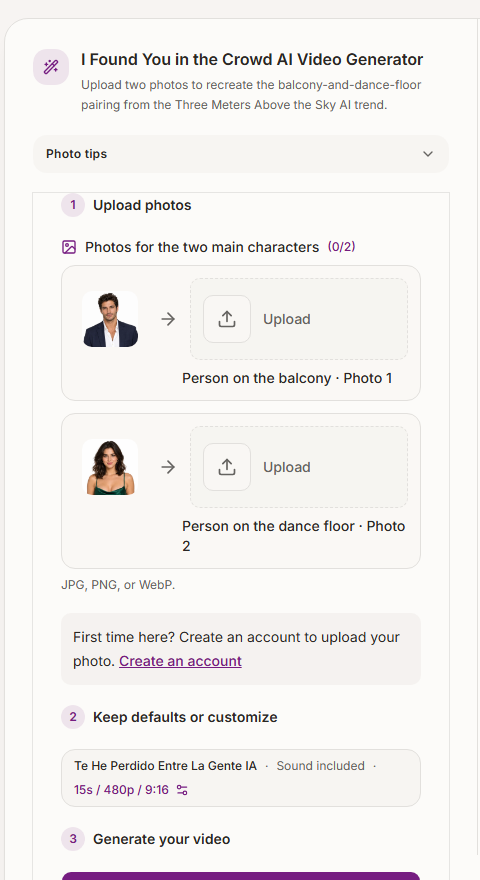
The live generator labels both photo roles. The sample portraits illustrate the slots; upload your own photos.
2. Add one photo to each role
Choose a photo where the person's face is visible and reasonably well lit. Avoid group photos, strong beauty filters, face coverings, or extreme close-ups. These make it harder for a video model to keep the person recognizable as the camera moves.
- Person on the balcony · Photo 1: the person watching from above. Use a clear face photo; a neutral or curious expression works well.
- Person on the dance floor · Photo 2: the person appearing among the crowd. Choose a distinct photo of the second person, with the face unobstructed.
If you only want to replace one character, use the role controls offered by the generator and follow the labels shown there. Do not upload the same image twice unless you want both roles to use the same person.
3. Review the video settings and credit estimate
The default format is 15 seconds, 480p, and 9:16, currently estimated at 10 credits. You can change the aspect ratio, duration, or resolution. The estimate updates with your choices, so check it in the generator before starting the task.
The vertical 9:16 format is convenient for TikTok, Reels, and Shorts. A higher resolution or longer duration can change the cost and may take longer to generate.
4. Create the video and review the result
Select Create my video and leave the page open while the task is processing. When it is ready, review the preview before downloading. Check that the balcony remains above the dance floor and that the two people stay in their intended roles. AI video generation can vary between runs, so faces, framing, and small movements may not match the reference exactly.
If a free preview is available for your account, the generator will show the eligibility and unlock details there. Review the current credit estimate before unlocking the complete video.
5. Download and share
Download the finished MP4 from your videos area. The generated video includes “La Tormenta de Arena”, so you do not need to add a separate audio track. Review the finished clip and the platform's rules before sharing it.
See real video examples
These are examples already shown on the site's generator page. They demonstrate the balcony-and-crowd composition; your own result will use the people in your photos.
Where the trend comes from
“Three Meters Above the Sky” refers to the Spanish film Tres metros sobre el cielo, also released in English as Three Steps Above Heaven. The balcony-above-the-dance-floor image is the visual idea people use when describing this AI trend. You can check the film record in the Spanish Film Catalogue (ICAA).
The song associated with the trend is “La Tormenta de Arena” by Dorian. The band published the official music video. This site's generated videos include the song; third-party video tools may handle audio differently.
Some people also search for the idea as “I Found You in the Crowd.” Those names point to the same balcony-and-dance-floor video concept, so you can start from the generator or read the copyable AI prompt.
Common problems and fixes
The two people appear in the wrong roles
Check the labels before generating: Photo 1 is the balcony person, and Photo 2 is the dancer. Use two different, clear face photos and avoid a source image that contains several people.
A face changes during the video
Try a sharper, front-facing photo with even lighting. Identity consistency is a known challenge in multi-shot generation; adding more prompt wording cannot guarantee that every frame will preserve every detail.
The balcony or height difference is unclear
Use the role-specific upload slots and keep the scene description simple. The reference motion guides the composition, but camera framing can still vary in a generated result.
The generated video is missing the song
Videos created with this site's generator include “La Tormenta de Arena.” If you use a separate video model or editor, its audio behavior depends on that tool.
Frequently asked questions
How many photos do I need?
Use two photos to personalize both people: one for the balcony and one for the dance floor.
Can I make the trend with my own photos?
Yes. Upload photos you own or have permission to use. The generator uses them as visual references for the two roles.
Is the video identical to the viral clip?
It follows the same general balcony-and-crowd idea and includes the trend song, with your uploaded people in the scene. Exact framing, facial details, and movement can vary between generations.
Can I use a CapCut template instead?
A CapCut template is an editing workflow for arranging clips and transitions. This page's generator creates a new AI video from your two photos. They are different ways to make a similar trend.
Where can I read the prompt?
Use the Three Meters Above the Sky AI prompt page for a copyable prompt and guidance for adapting it to other video tools.